01
Home is the Daily Brief.Base
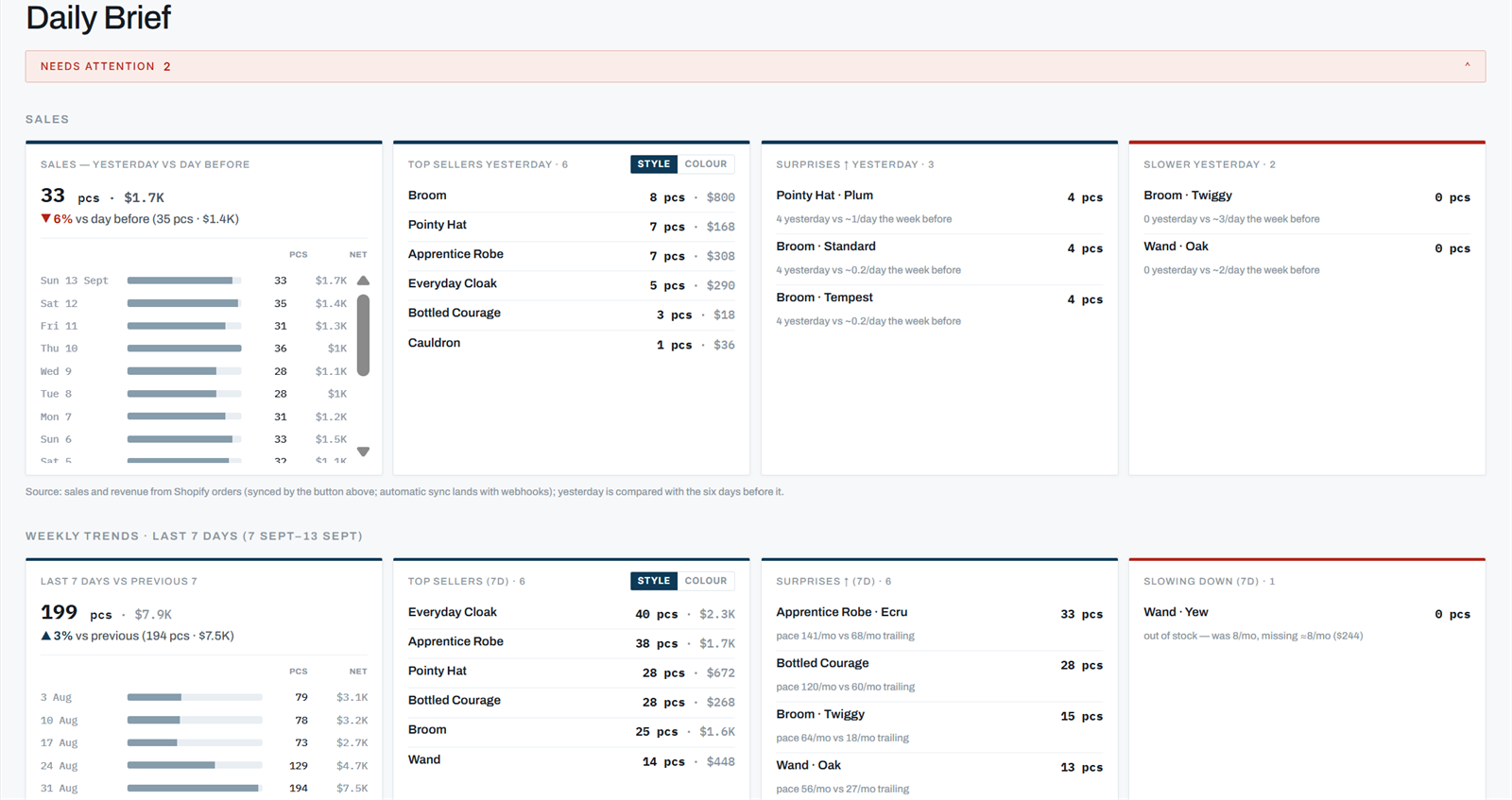
Not a dashboard: a brief. Yesterday against the day before, the last seven days against the seven before, and a red strip at the top for whatever needs attention. It reads the same numbers the planner uses, so the two never disagree.
Home, on a Monday. The attention strip at the top counts what's out and selling and what it costs per week.
- Sales
- Pieces and net revenue, yesterday against the day before, then the last seven days against the previous seven, with the daily bars behind them.
- Top sellers
- By style or by colour, one switch. Pieces and revenue each.
- Surprises and slowdowns
- What sold faster than its own pace and what sold slower, for yesterday and for the week, with the pace it was measured against. A line with nothing on the shelf didn't slow down, it ran out, and the brief says so.
- Needs attention
- What's out and selling, what runs out inside your cover, and any order past its date. Each one links to the row it came from.
- The digest
- The same brief, in your inbox, once a day at most, only on days there is something to say. You pick the cover threshold (7, 14 or 21 days). Every email has a one-click unsubscribe.
02
The Inventory Planner, worst first.Base
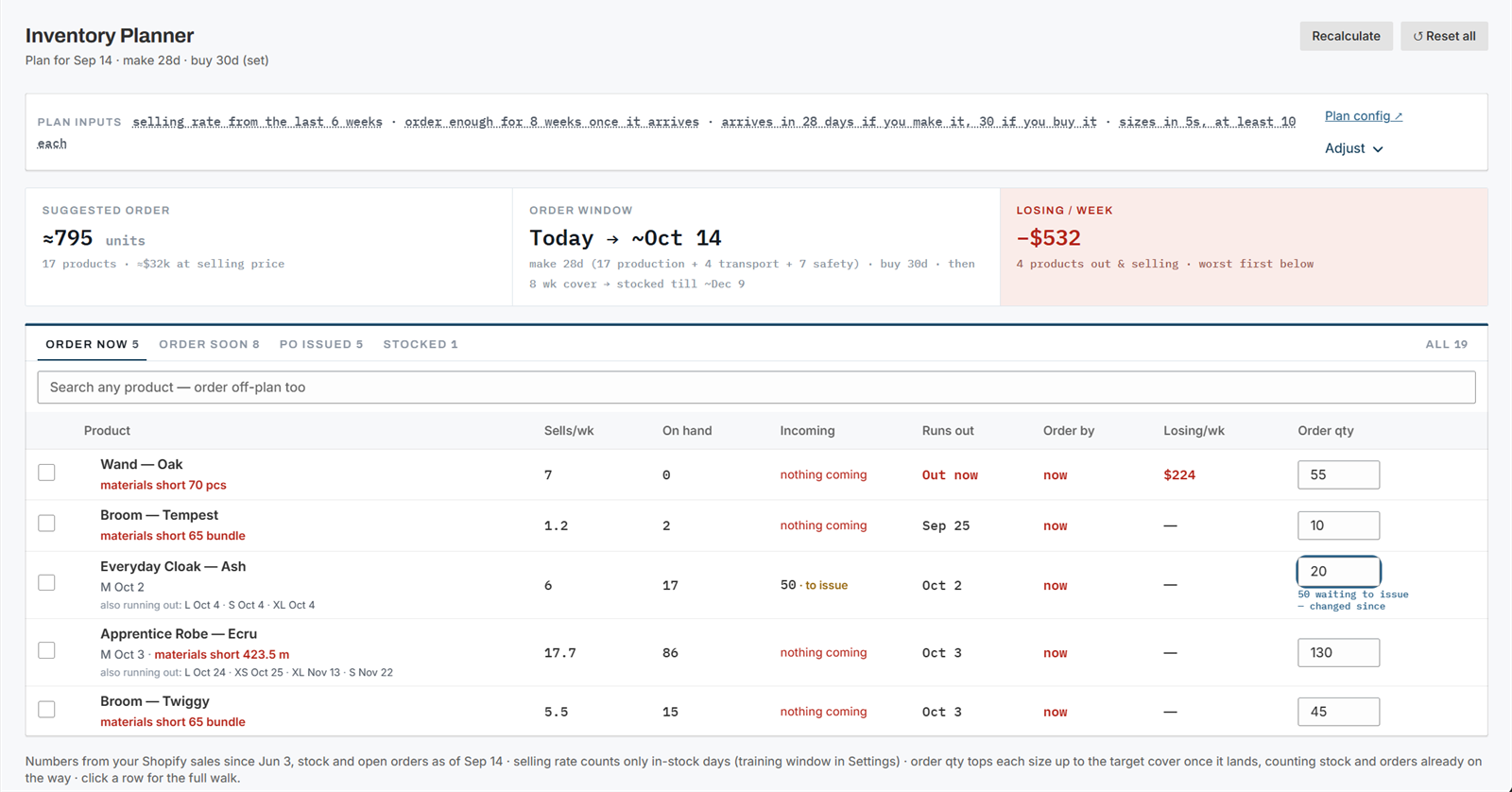
One row per product. The plan's inputs are written out as a sentence at the top, and every term in it links to where it is set. Three numbers above the table: what to order, the window it covers, and what being out is costing you this week.
Order now. Wand · Oak is out, nothing is coming, and it's losing $224 a week. The box on the right is the order quantity; type over it.
- Tabs
- Order now, Order soon (order-by date within 30 days), PO issued (covered by an open order), Stocked, All. An issued order that isn't enough keeps its row under Order now, with an amber rule and "not enough" beside the incoming figure.
- Columns
- Sells per week, on hand, incoming (always with a date, or "nothing coming" in red), runs out, order by, losing per week, order quantity.
- The meta line
- Under every product name, in the same order every time: which sizes are out and when the next one goes, any broken promise on a purchase order (linked), and the material verdict for made products.
- Push
- Tick rows, push, and the quantities land in the order pool per supplier. Edit after pushing and the row says "changed since" until you push again. Search any product to order off-plan.
- Recalculate, Reset all
- Change an input and the plan recomputes on the spot. Reset all puts every typed-over number back to the suggestion; per-row resets do it one product at a time.
02, expanded
Click a row. Get the working.
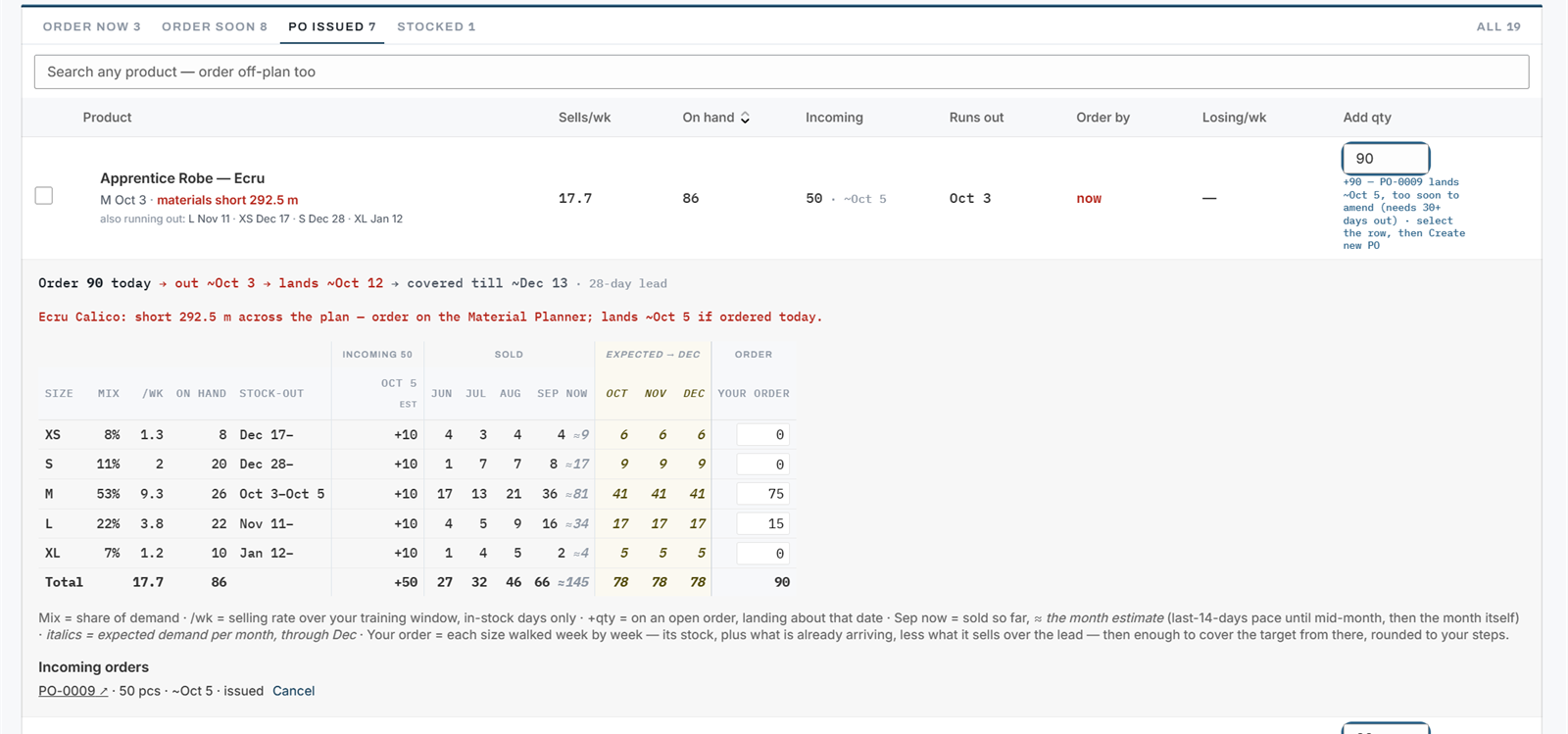
Every suggestion opens into the walk that produced it, per size: mix, selling rate, on hand, stock-out date, what's arriving and when, what sold by month, what's expected through the cover, and your order. The one-line summary at the top is the whole argument.
Apprentice Robe · Ecru: "Order 90 today → out ~Oct 3 → lands ~Oct 12 → covered till ~Dec 13 · 28-day lead". The red line names the material that's short and where to order it.
- Sold, then expected
- Sales by month with the current month estimated from its pace so far, then expected demand per month through the cover window, in italics so you can tell history from forecast.
- Incoming, by date
- One column per arrival date, with the purchase orders behind it linked at the foot. Orders that share a date are merged.
- Your order
- One box per size. Proso rounds to your step size and floors at your smallest size quantity. Change one and the row total follows.
- Bundles
- When part of a product's demand comes through a bundle, the expansion says so: "demand includes ≈N/wk via X". The planner orders components, never kits.
receiving is the part everyone skips
03
Inventory POs: pool, issue, track, receive.Full · one-click ordering in Base
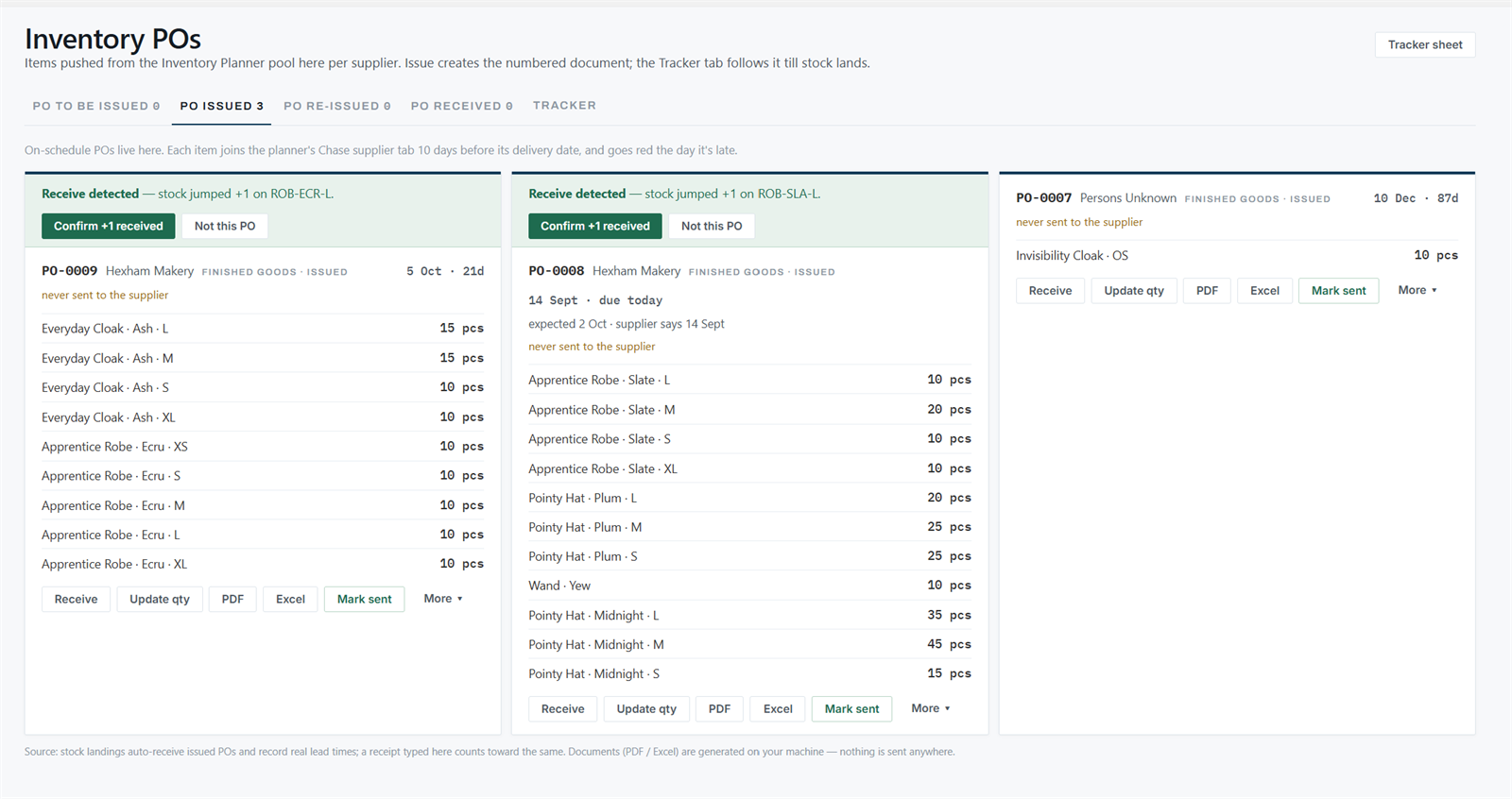
Pushed lines wait per supplier under PO to be issued. Issuing gives the order a number and a document. From then on it's a card with every action an order ever needs, and a row on the Tracker until the stock lands.
PO issued. The green strip on the left two cards is the hourly sync noticing stock landing in Shopify and asking whether that was this order.
- Tabs
- PO to be issued, PO issued, PO re-issued (revision 2 and up, with a red count of revisions not yet sent), PO received, and the Tracker.
- Card actions
- Receive (part or all of any line), Update qty (an amendment bumps the revision; the document prints "Rev N, supersedes earlier versions"), PDF, Excel, Mark sent, log a chase with a note, record a promised date, reorder the remainder, cancel.
- Auto-receive
- Daily inventory snapshots. A jump in on-hand after the order date closes the order and records the real lead time. An ambiguous jump becomes a one-click question. Nothing by the date plus grace goes red on the planner row and sorts first on the Tracker.
- Documents
- PDF and Excel per order, on your letterhead with your tax and terms, plus a Tracker sheet of every open order. Generated on your machine; nothing is sent anywhere until you send it.
- Tracker
- The board: every open order with its step pipeline (confirmed, in production, dispatched), open pieces, and the date with its slip. Late ones red-ruled and first. Click through for the order's own page and its history.
- Without the module
- Base stores get Ordered items: one click marks a planner line ordered, the sync receives it, the lead time is learned. Same loop, less paper.
04
The Material Planner: what the plan needs, per material.Full
For stores that make what they sell. Every made product carries a bill of material, so the plan's quantities become metres, kilos and pieces of material. This table answers what's short, what's coming, and what you can make right now.
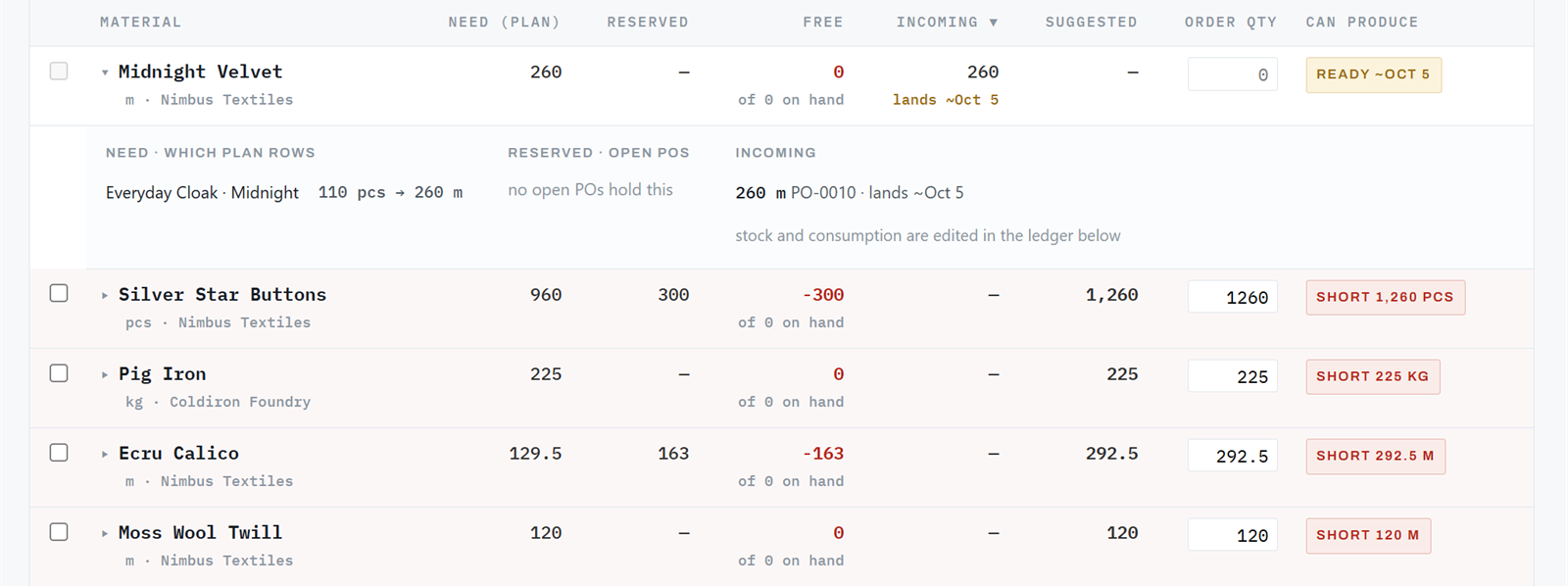
Midnight Velvet is covered by an order landing Oct 5. Silver Star Buttons are short 1,260 pieces. The order box is already filled with the shortfall.
- Columns
- Need (from the plan), reserved (held by open production orders), free, incoming with its date, suggested (need less free less incoming, rounded to the minimum order), order quantity, and the verdict.
- Verdicts
- Materials ✓Ready ~Oct 5Short 292.5 mNo material linked The same four chips appear on the planner rows of every made product, and a click filters this table to the material behind it.
- Expansion
- Which plan rows need it and how much each, which open orders hold it, and what's incoming. Stock and consumption are edited in the ledger under Product Settings.
- Push
- Tick, push, and the quantities pool on Material POs per supplier. A material learns its supplier the first time you issue.
- Knobs
- Wastage percentage, minimum order quantity per material, and the tolerance that separates "short" from "close enough". All in Settings, none hard-coded.
05
Material POs: the same loop, for materials.Full
Fabric, parts and ingredients get their own pool, their own numbered orders, their own Tracker. Nothing about the loop changes; the units do.
tabsPO to be issued · PO issued · PO re-issued · PO received · Tracker
unitsmetres, kilos, pieces, litres: decimals kept end to end, mixed units never summed
receivingwrites the material ledger, so free stock on the Material Planner moves the same day
documentsthe same PDF and Excel, the same letterhead, the same revision rules
lead timelearned per material supplier; feeds the "ready ~date" verdict on the planner
06
Imports: three doors, one pipeline, one undo.Base
Bring what you already have. Proso adds and never overwrites, shows you the preview first (what matched, what didn't, what it will skip), and undoes the whole import in one click if it looked wrong.
TemplateAI pasteStocky CSV
Templatean Excel workbook, one sheet per thing, with a "tell your AI" prompt so your own assistant can fill it
AI pastepaste whatever you have; Claude shapes it into the template and you review before anything commits
Stockyproducts, purchase orders, received history; suppliers rebuilt from the PO files
AI imports: ten a month per store, at no charge. after that, the template and Stocky doors stay open and unlimited.
- What comes in
- Suppliers, open purchase orders (they count as incoming and appear on the Tracker), received purchase orders, materials, bills of material, bundles.
- What doesn't
- On-hand stock and sales for finished goods. Shopify is the fact for those, and Proso already reads it.
- Why it matters
- Received orders count as observed lead times, so the plan is calibrated before you've placed a single order in Proso.
07
Product Settings: how each product is planned.Base · materials in Full
Everything Shopify knows was read already: names, variants, vendors. This is where you tell Proso the things it can't know, once per product.
Stylesmake or buy, supplier, size scale (detected per product from its options), exclusions, notes
Bill of materialmaterials per product, consumption per size, a different primary material per colour
Materialsthe master list with unit, supplier, minimum order; the ledger (received, used, wasted, adjusted); consumption
BundlesShopify bundles read from the catalog the moment you create them; manual kits in two fields; "sellable now, limited by X"
a size scale is per product, never a store-wide setting: letters, numbers, grams and millilitres can all live in one catalog.
08
Settings: five tabs, one per question.Base
Every assumption the plan makes is a number here, with the formula written next to it. Change one and the planner recomputes. Leave the lead time blank and Proso learns it.
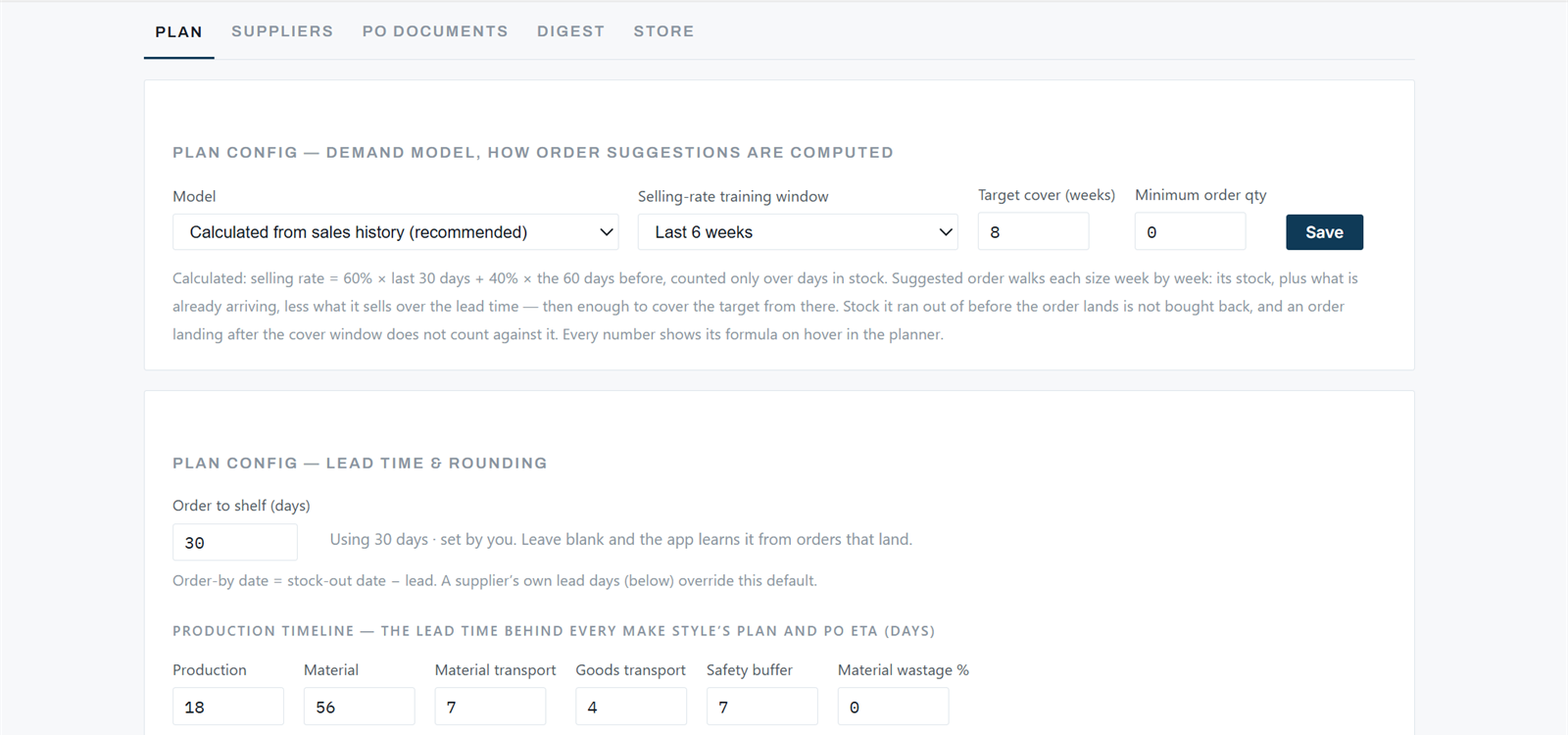
The Plan tab. The paragraph under the dropdowns is the demand model, in words, and it changes when the model does.
- Plan
- Demand model (calculated from sales history, or ad-driven: budget × ROAS). Selling-rate training window (weighted 60/40, or a flat 4, 6, 8 or 12 weeks, or all time). Target cover. Minimum order. Order-to-shelf days. The production timeline for made products: production, material, transport, safety, wastage. Rounding per size.
- Suppliers
- Each supplier's own lead days, learned or set, which override the store default on their rows.
- PO documents
- Letterhead, registered name, tax number, payment terms: what prints on every PDF.
- Digest
- On or off, the cover threshold, the address, and "send me one now".
- Store
- Name, currency and timezone (read from Shopify), and the modules: purchase orders and suppliers, production and materials.